 ChainShot
Screenshots that can stand as evidence.
A screenshot pasted into a report proves nothing on its own. ChainShot records each capture with its time, case and examiner, hashes it and chains it to the previous one, so that anyone can check later that nothing was edited, removed or re-dated.
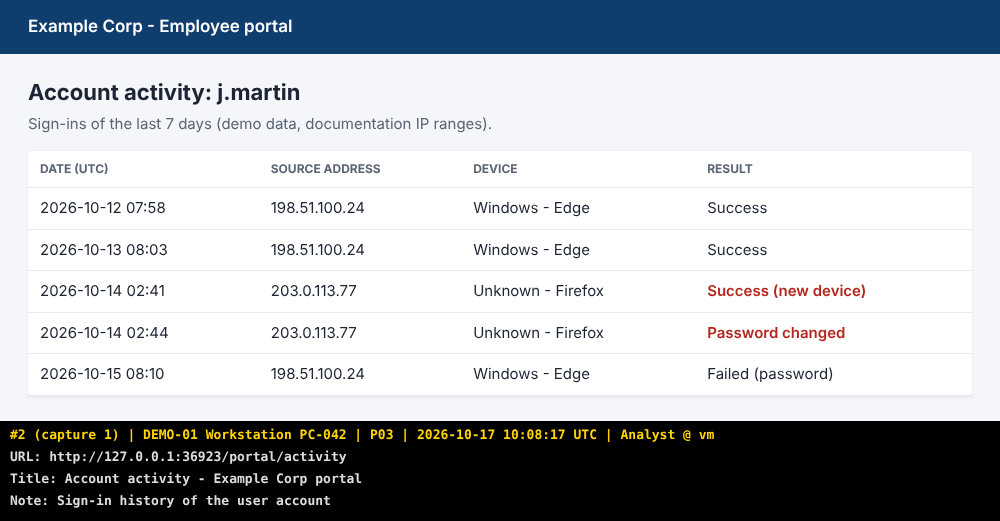
Every capture says what it is
ChainShot draws a banner below the image, never over it, so no captured pixel is hidden. The same facts go into the journal, protected by the hash chain.
- #12
- entry number in the journal, the one to quote in your report
- case, tag
- the case and the question or step you are documenting (P17)
- UTC
- capture time, with local time and offset in the journal
- examiner
- who captured it, on which computer
- URL, title
- for web pages and windows, recorded automatically
- SHA-256
- fingerprint of the final PNG, written to the journal
From capture to proof
Capture
Screen, window, region or web page, with a hotkey from any application. Files and notes too.
Hash
The SHA-256 of each file is written to an append-only journal.
Chain
Each entry is hashed with the previous one: edit, delete or reorder anything and the chain breaks.
Seal
A seal freezes the journal; an RFC 3161 authority can certify its time. Its SHA-256 goes in your signed report.
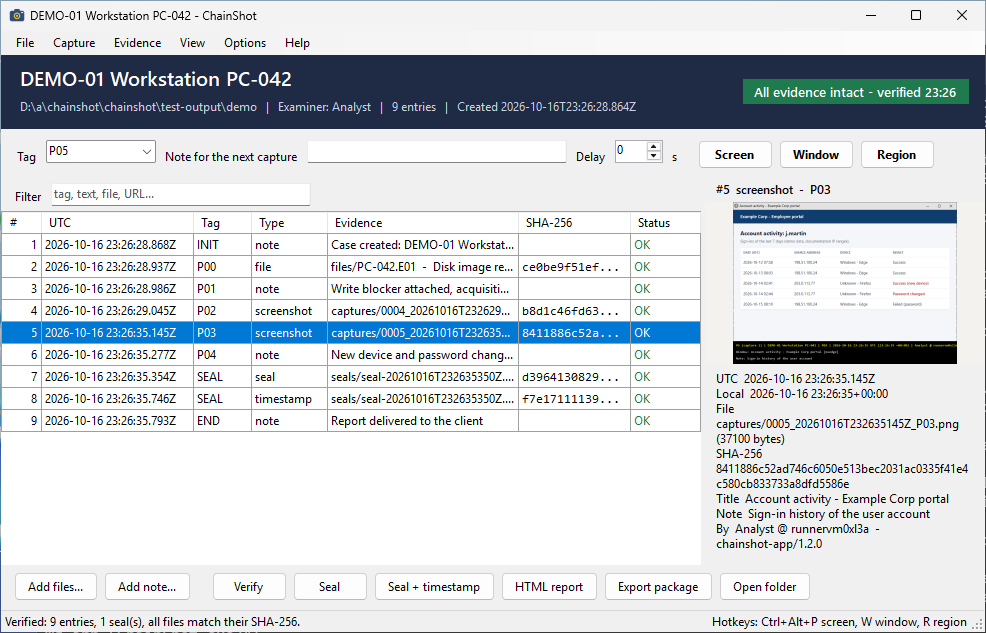
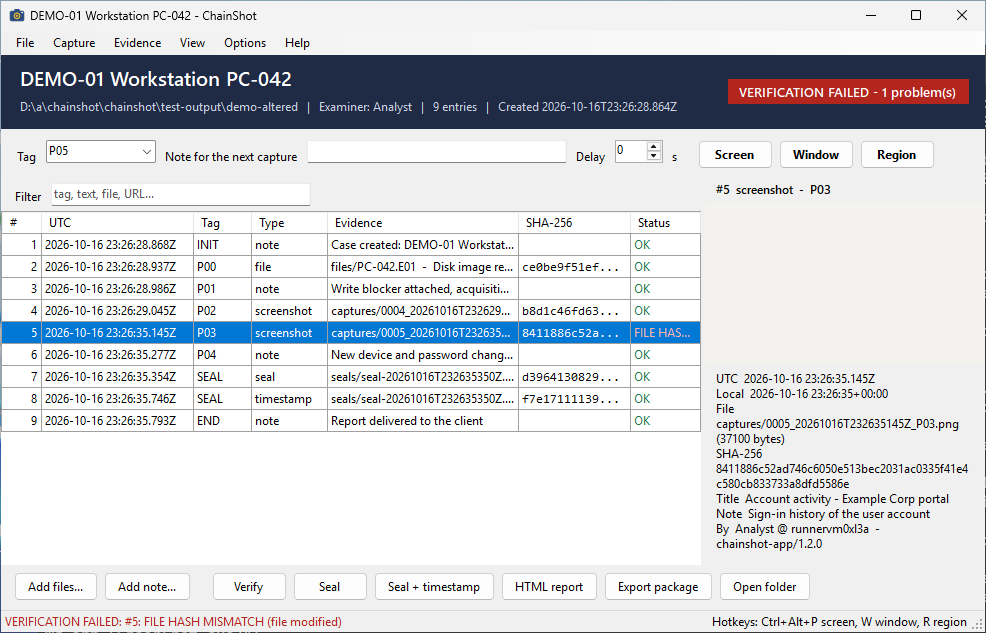
Change one byte, and it shows
The same case, before and after a few bytes of one capture were changed. ChainShot re-hashes every file when it verifies a case, and the independent verifier does exactly the same.
One format, four tools
They all write the same journal, tested against the same vectors: start a case in the app, add web pages from the browser, script it in PowerShell, verify it anywhere.
ChainShot for Windows
Windows 10 and 11, one file, no installation
Cases, captures with global hotkeys, files by drag and drop, journal with preview, verification, seals, HTML report and evidence package for delivery.
Browser extension
Chrome, Edge, Brave, Firefox
Visible area or full page, URL and title recorded, optional MHTML archive of the page. Saves into its own case or straight into the case open in the app.
PowerShell module
Windows PowerShell 5.1 and PowerShell 7
Every feature as a command, for scripts and command-line users, with its own tray icon.
chainshot.py
Any system with Python 3.9+, no dependency
The reference verifier: a client or an auditor checks a case without trusting the tool that made it.
Download
Windows app
# winget
winget install Dalkin69.ChainShot

# Scoop
scoop bucket add chainshot https://github.com/Dalkin69/chainshot
scoop install chainshot
winget lists ChainShot once Microsoft has reviewed it; Scoop works from the first release.
Or download the zip from GitHub,
check it against SHA256SUMS.txt and run ChainShot.exe. The executable is not
code-signed yet: Windows may ask you to confirm the first launch (why).
Browser extension
Install it from the Chrome Web Store (Chrome, Edge, Brave) or Firefox Add-ons.
PowerShell, Python
pipx install "git+https://github.com/Dalkin69/chainshot#subdirectory=python"
PowerShell: chainshot-powershell-*.zip, then Install-ChainShot.ps1.
Received a case? Check it yourself.
You do not need ChainShot's capture tools, only Python. An evidence package already contains
chainshot.py, a VERIFY.txt and the SHA-256 of every file.
python chainshot.py verify DEMO-01
...
    9  2026-10-17T09:41:12Z  END  OK
Seal seal-20261017T094112Z.json: OK
  RFC 3161 imprint OK, signature valid

9 entries, 0 problem(s), 1 seal(s).
RESULT: ALL EVIDENCE INTACT
Your evidence stays yours
- No telemetry, no analytics, no account, no update check. ChainShot never connects to the internet on its own.
- The only network request is the RFC 3161 timestamp you ask for, and it sends nothing but the SHA-256 of a seal.
- Open source under the MIT license. Releases are built from the public repository by GitHub Actions, with their SHA-256.
- This website uses no cookies, no trackers and no external fonts or scripts.